-
Shop
- Advanced Technologies
- Beauty
- Best-Sellers
- Car Accessories
- Dating & Social Skills
- Digital Resources
- AI & Technology
- AI Skills
- Car Buying & Ownership
- Cozy Feast Collection
- Electronics & Technology
- Emotional Intelligence
- Financial Education
- Hobbies
- Home Styling & Organization
- Kitchen & Recipes
- Mindfulness
- Mindset
- Online Business
- Parenting & Child Development
- Pet Lifestyle & Wellness
- Positive Thinking
- Productivity
- Self Confidence
- Sleep Improvement
- Smart Life with AI
- Stress Management & Relaxation
- Travel Planning
- Yoga & Fitness
- Yoga & Mind-Body Practices
- Education & Learning
- Family & Parenting
- Fashion
- Fashion Accessories
- Furniture
- Gadgets
- Health & Beauty
- Health & Wellness
- Home & Garden
- Home Supplies
- Kids & Babies
- Kitchen
- Kitchen Best-Sellers
- Lighting
- Patio, Lawn & Garden
- Personal Growth
- Personal Style & Fashion
- Pet Care
- Pet Supplies
- Pets
- Sport & Outdoors
- Super Deals
- TikTok Growth & Monetization Mastery
- Travel
- Wealth
- Wealth Building
- Budgeting & Saving
- Cryptocurrency Investing
- Debt Management
- Entrepreneurship & Business Growth
- Family Finance & Budgeting
- Financial Independence
- Financial Mindset & Psychology
- Financial Planning
- Frugal Living & Expense Hacks
- Goal Setting
- High-Income Skills
- Investing Basics
- Leadership
- Motivation
- Networking & Mentorship
- Passive Income Strategies
- Real Estate Investing
- Side Hustles
- Stock Market Investing
- Wellness
- Popular
- Best deals
104-Key RGB Wired Mechanical Keyboard for Work & Gaming
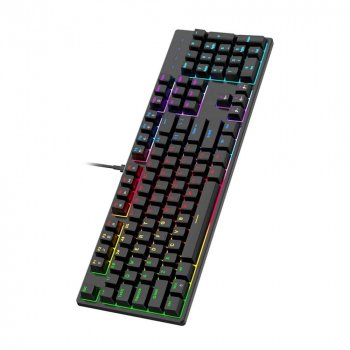
RGB Mechanical Wired Keyboard with 104 Keys for Gaming & Office Use
A keyboard should keep up with fast inputs in games and stay comfortable through long work sessions. Our RGB Mechanical Wired Keyboard with 104 Keys for Gaming & Office Use is built for both: a full-size layout for productivity, a mechanical feel for consistent presses, and RGB lighting for clear visibility and desk style—without adding wireless charging or battery headaches.
If you split your time between spreadsheets and raids, writing and ranked queues, or daily emails and nightly gaming, a straightforward wired mechanical board can be the simplest upgrade you feel every day.
Built for two modes: focus at work, speed in-game
When you rely on a keyboard for hours at a time, the basics matter more than flashy extras. Our team focused on the features that translate directly to everyday use.
- Full-size 104-key layout keeps the number pad and function row ready for spreadsheets, shortcuts, and daily tasks.
- Mechanical key feel supports consistent actuation and faster repetition for gaming combos, editing workflows, and frequent typing.
- Wired connection keeps input stable and removes battery maintenance—plug in and stay ready.
What a 104-key layout unlocks at the desk
A full-size keyboard isn’t just “more keys.” It’s fewer compromises. If you regularly enter numbers, navigate documents, or use function shortcuts, 104 keys keeps those actions direct—no layers, no toggles, no reaching for on-screen controls.
- Number pad speeds up data entry, finance tasks, and quick calculations.
- Dedicated navigation cluster (Insert/Home/Page keys) supports document work and code navigation without extra layers.
- Standard spacing makes it easier to swap between laptops and desktops with minimal relearning.
- Room for familiar keycaps and muscle memory when switching from office setup to gaming setup.
Full-size layout: common uses by key group
| Key group | Why it matters | Best for |
|---|---|---|
| Function row (F1–F12) | Quick access to system/app shortcuts | Productivity, MMO keybinds |
| Number pad | Fast numeric input and calculator-style entry | Office work, accounting, inventory |
| Arrow + navigation keys | Precise movement through text and menus | Editing, coding, strategy games |
| Main alphanumeric area | Daily typing and gameplay controls | Everything |
RGB lighting that stays practical
RGB can be more than decoration when you use it with intent. In a dim room, backlighting reduces missed keystrokes and helps you stay oriented on the board. It can also act as a quick “mode cue,” so your desk setup matches what you’re doing.
- Visibility in low light helps when the monitor is the main light source or you work late.
- Simple lighting profiles can act as context cues: calmer patterns for focus, brighter effects for play.
- Key-zone reminders can make it easier to keep work keys and game keys mentally separated.
A practical approach: pick one clean, steady look for work, and save reactive or brighter effects for gaming so the lighting supports your attention instead of competing for it.
Wired reliability for consistent input
Wireless can be convenient, but wired is still the “set it and forget it” option—especially on shared desks, docking stations, or busy setups with lots of devices nearby.
- No pairing steps and fewer points of failure when you just want to get started.
- Consistent power supports stable lighting without tracking charge levels.
- Easy for shared setups: plug into a workstation, gaming PC, or dock and you’re ready.
Comfort tips for long sessions
Even a great keyboard feels “wrong” if your posture is off. Small changes in height, reach, and wrist position can help you stay comfortable whether you’re doing a two-hour gaming session or an eight-hour workday.
- Keep wrists neutral by setting the keyboard height so your hands aren’t bent up or down. If you type for hours, a wrist rest can help support pauses between bursts of typing.
- Reduce distraction by starting with lower RGB brightness and only increasing it when needed for visibility.
- Dial in placement so elbows stay close to your body and shoulders stay relaxed; moving the keyboard an inch closer can reduce fatigue.
For additional posture and repetitive strain basics, you can review guidance from OSHA’s Computer Workstations eTool and the NHS overview on repetitive strain injury (RSI).
Getting started in minutes
We like setups that don’t require a weekend project. You can go from unboxing to typing quickly with a simple routine.
- Connect via the wired cable and confirm it’s selected as your default input device.
- Pick a lighting style that matches the environment: steady for work, reactive patterns for gaming.
- Create a two-level habit: one brightness for daytime, another for night sessions.
A straightforward choice for a cleaner setup
In-stock picks from our store
- RGB Mechanical Wired Keyboard with 104 Keys for Gaming & Office Use
- Understanding Attachment Theory for Parents – A Practical Parenting Guide (Digital Download)
- Versace Reversible Jacket with Iconic Barocco Pattern
FAQ
Is a wired mechanical keyboard better for gaming than wireless?
Wired connections are simple and consistent because you don’t have to manage pairing or battery life. For gaming, that reliability can be the main advantage—plug in, play, and keep lighting stable without worrying about charging.
Is a 104-key keyboard good for office work?
Yes—104 keys gives you a number pad for fast data entry and a full navigation cluster for documents, spreadsheets, and shortcuts. The standard full-size layout also makes it easy to move between different computers without relearning key placement.
How should RGB lighting be set up for work and gaming?
For work, use steady lighting at a comfortable brightness so it improves visibility without pulling your attention. For gaming, you can switch to brighter or reactive effects, and you can use colors to create simple “zones” for commonly used keys.











Leave a comment